
How to make Dropbox ignore the node_modules folder
In this article I'm going to show you how to get Dropbox to ignore the node_modules folder.
Why code in a Dropbox folder?
I recently bought a new computer and experienced the pain of having to sync around 300Gb of files from one Windows machine to another. This was primarily due to the in-progress music projects on my computer.
So I decided that I would just work within my Dropbox folder on my new computer. In the past, I've spoken to colleagues who did this. They were mostly artists, and didn't use git.
What I didn't consider at the time, was that this would mean there would be multiple syncing mechanisms for my code. I would be sending the files both to Dropbox and Git.
Even worse, Dropbox locks files while it is working. So if you are running something like "npm install" or "npm update", those processes can fail because they can't work on a file at the same time as Dropbox.
I began experiencing these problems almost immediately, so I either had to find a way to ignore the node_modules folder in Dropbox or stop working on code within the Dropbox folder.
Dropbox ignore syntax
Fortunately, Dropbox gave us a way to ignore files or folders a few years ago. So for Windows users, the following command will ignore your node_modules folder. Please note that this needs to be done for every project, and that the command needs to be completed with your actual directory structure.
Set-Content -Path 'C:\Users\yourname\Dropbox\yourproject\node_modules' -Stream com.dropbox.ignored -Value 1
What are common mobile usability issues and how can you solve them?
In this article, I'm going to show you some common mobile usability issues reported by Google, and show you how to fix them using basic css.
Mobile usability issues in Google Search Console
A few days ago I received this rather alarming email from Google.
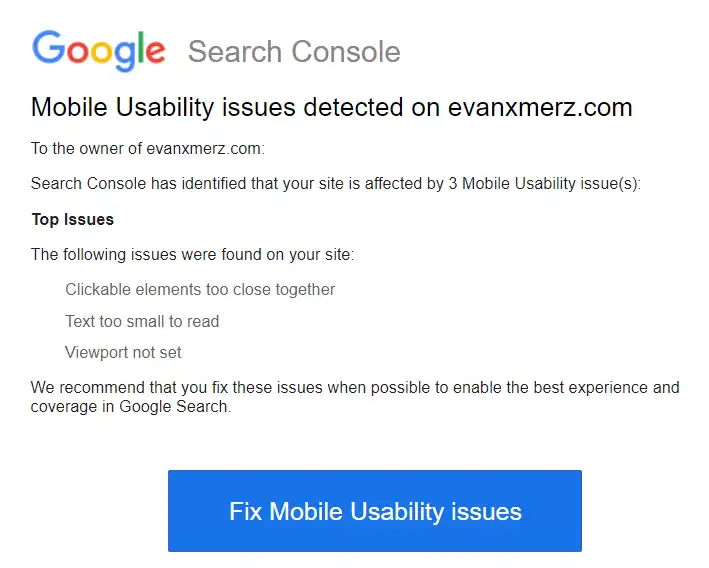
I was surprised to see this, because, although my blog isn't the most beautiful blog on the web, I pride myself on the clarity for reading on any device. So I logged into Google Search Console and found the "Mobile Usability" link on the left side to get more information.
Search console gave me the same three issues.
- Viewport not set
- Text too small to read
- Clickable elements too close together
Search console said they were all coming from https://evanxmerz.com/soundsynthjava/Sound_Synth_Java.html. This url points at the file for my ebook Sound Synthesis in Java. This ebook was written using markup compatible with early generations of Kindle devices, so it's no surprise that Google doesn't like it.
When I opened the book on a simulated mobile device, I could see that the reported mobile usability issues were apparent.
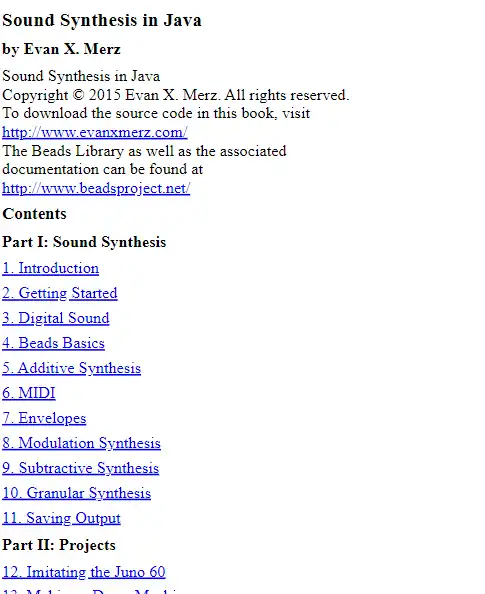
Let's go through each of the issues and fix them one by one. This will require some elementary CSS and HTML, and I hope it shows how even basic coding skills can be valuable.
Viewport not set
Viewport is a meta tag that tells mobile devices how to interpret the page on a device. We need to provide it to give web browsers a basis for showing a beautiful page to viewers. In practical terms, this means that without a viewport meta tag, the fonts on the page will look very small to viewers on mobile devices because their browsers don't know how to scale the page.
To solve this issue, add this line to the html head section.
<meta name="viewport" content="width=device-width, initial-scale=1">
This may also solve the remaining issues, but we'll add some css for them just to be sure.
Add a CSS file
The following two fixes require us to use some css, so we will need to add a CSS file to our webpage.
Early kindles didn't support much css, so it was better to just format your books with vanilla html and let the Kindle apply formatting. That limitation doesn't apply to the web, though, so I created a file called styles.css in the same directory as my html file, and added this line within the head section of my html page. This tells the page to pull style information from the file called "styles.css".
<link rel="stylesheet" href="styles.css">
Next we need to add some style rules to fix the remaining mobile usability issues.
Text too small to read
Making the font larger is easy. We could do it for only mobile devices, but I think increasing the font size slightly will help all readers. The default font size is "1rem" so let's bump it up to 1.1 by adding the following code to our css file.
body {
	font-size: 1.1rem;
}
Clickable elements too close together
The only clickable elements in this document are links. So this means that the text is too small, and the lines are too close together. The previous two fixes might also address this issue, but just in case they don't, let's make the lines taller by adding another line to our body css.
body {
	font-size: 1.1rem;
	line-height: 1.5;
}
The default line-height is 1. By moving it to 1.5, we are making lines 50% taller. This should make it easier for users to click the correct link.
Putting it all together
In addition to solving the mobile usability issues from Google, I wanted to ensure a good reading experience on all devices, so here's my final set of rules for the body tag in my css file.
At the bottom I added rules for max-width, margin, and padding. The max-width rule is so that readers with wide monitors don't end up with lines of text going all the way across their screens. The margin rule is an old-fashioned way of horizontally centering an element. The padding rule tells the browser to leave a little space above, below, and beside the body element.
body {
	font-size: 1.1rem;
	line-height: 1.5;

	max-width: 800px;
	margin: 0 auto;
	padding: 10px;
}
When I opened up the result in a simulated mobile device, I could see that the issues were fixed.

How to conquer Google Core Web Vitals
In 2021, Google finally launched their long awaited Core Web Vitals. Core Web Vitals are the measurements that Google uses to measure the user experience (UX) on your website. These include metrics tracking things like how long the page takes to load images, how long it takes to become interactive, and how much it jitters around while loading.
Core Web Vitals are important to all online businesses because they influence where your site appears on Google when users are searching for content related to your site. They are far from the only consideration when it comes to search engine optimization (SEO), but they are increasingly important.
In this article, I'm going to give you a high level overview of how you can get green scores from Google's Core Web Vitals. We're not going to dig into implementation level details, yet, but we will look at the general strategies necessary to optimize the scores from Google.
This article is informed by my experience optimizing Core Web Vitals scores for the websites I manage and develop professionally. It's also informed by my study and experimentation on my own websites and projects.
Prepare for a long battle
Before we begin, I want to set your expectations properly. On any reasonably large website, Core Web Vitals scores cannot be fixed in a night, or a weekend, and maybe not even in a month. It will likely take effort each week, and in each development project, to ensure that your scores get to the highest level and stay there.
This is the same expectation we should have for any SEO efforts. It takes time to get things right in the code, the architecture, and in the content. All three of those things must work together to put your site on the first page of Google search results for high volume search terms.
In my experience, a successful SEO operation requires coordination of web developers, SEO experts, writers, and whoever manages the infrastructure of your website.
1. Understand Core Web Vitals
The first step to conquering Core Web Vitals is to understand what they are measuring. So get access to Google Search Console, and start looking at some reports. Use PageSpeed Insights to start looking at the values that Google is actually calculating for your site.
Don't be scared if your scores are really low at first glance. Most sites on the internet get very low scores because Google's standards are incredibly high.
You should see some aronyms that represent how your site did on key metrics. There are four metrics that are used to calculate the Core Web Vitals score for a page.
- LCP = Largest Contentful Paint.
- The LCP of a page is how long it takes for the largest thing to be shown on screen. Typically this is the banner image on a page, but PageSpeed Insights can sometimes get confused if you use header tags in the wrong places.
- FCP = First Contentful Paint.
- The FCP of a page is how long it takes for anything to appear on screen.
- CLS = Cumulative Layout Shift.
- The CLS is a measure of how much elements on the page jitter around while the page is loading.
- FID = First Input Delay.
- FID is how long it takes for the page to respond to a click.
2. Make the right architecture decisions when starting a new site
Most people can't go back in time and choose a different platform for their site. Most people are stuck with the architectural decisions made at the beginning of the project. If you're in that category, then don't fret. The next section will talk about how you can maximize existing infrastructural technologies to get the maximum performance out of your website.
On the other hand, if you are starting from scratch then you need to critically consider your initial architectural decisions. It's important to understand how those architectural decisions will impact your Core Web Vitals score, and your search ranking on Google.
Client side rendering vs. Sever side rendering
The most important decision you have to make is whether you will serve a site that is fully rendered client side or a site that renders pages on the server side.
I want to encourage you to choose a site architecture that is fully client side rendering, because client side rendering provides huge benefits when it comes to both scaling and SEO, and the drawbacks previously associated with client side rendering are no longer relevant.
Imagine the typical render process for a webpage. This process can be broken down into many steps, but it's important to realize that there are 3 phases.
- The server fetches data from a data store.
- The server renders the page.
- The client renders the page.
Steps 1 and 3 are unavoidable. If you have a backend of any complexity, then you must have a data store. If you want users to see your website, then their web browsers must render it.
But what about step 2? Is that step necessary? No. Even worse is the fact that it's often the most time-consuming step.
But if you build your site as a client-side js/html/css bundle that uses an API on the backend, then you can cut out the server side rendering entirely. If you want to maximize your site's Core Web Vitals scores, and hence your SEO, then you should cut out the server side rendering step if possible. Adding that step is inherently slower than strategies that eliminate it.
This means that platforms that are used for server side rendering are probably something to avoid in 2022 and beyond. So Ruby on Rails is probably a bad choice, unless you're only using it to build an API. Similarly, Next.js is probably a bad choice, unless you are only using it to generate a static site.
You should also look at benchmarks for various website architectures. You will see that vanilla React/Vue/Javascript sites generally outperform server side rendered sites by a wide margin.
But isn't a client side rendered site bad for SEO?
If someone hasn't done much SEO lately, then they may come up with this counterargument, that using client side rendering is bad for SEO. Up until around 2017, Google didn't run the javascript on web pages it was scanning. If the javascript wasn't executed, then a purely client side rendered page would show up as an empty page and never rank on Google. We had to come up with lots of workarounds to avoid that fate.
Since 2017, however, Google does run the javascript on the page. So having a purely client-side rendered site is perfectly fine.
Server side rendered sites are also harder to scale
I've scaled several websites in my career, so I can tell you that it's much more difficult to scale a server side rendered website than one that isn't server side rendered. To scale on the server side requires a complex balance of caching, parallelization, and optimization that is entirely unnecessary if your site is rendered client side.
It's true that you would still have to scale the API on the server side, but that's true in both cases.
3. Maximize mature web technologies
But what if you can't change the fundamental architecture of your website? Are you stuck? No. There are a number of web technologies that exist to mitigate the performance impact of various architectural decisions.
- Use a Content Distribution Network, especially for images. Take a look at services like ImgIX, which can optimize your images and play the role of a CDN. Other commonly used CDNs include CloudFront and CloudFlare.
- Optimize your cache layer. Try to hit the database as rarely as possible. The API that backs your site will get bottlenecked by something. Quite frequently, that something is your database. Use a cache layer such as REDIS to eliminate database queries where possible.
- Use geolocated servers. The CDN should take care of serving content from locations near your users, however, if requests are ever getting back to your web servers, make sure you have servers near your users.
- Enable automatic horizontal scaling of your server. You need to be able to add more servers during high traffic times, such as the holidays. To do so requires parallelizing your server code, and handling session across multiple servers. There are many ways to mitigate those problems, such as the sticky sessions feature offered by Heroku. You need to be able to scale horizontally at least on your API, if not on the servers that serve your site.
4. Monitor the results
Finally, you need to monitor Google Search Console every day. Google Search Console is one of the first things I check every time I open my work computer to begin my day. Make this a habit, because you need to be aware of the trends Google is seeing in the user experience on your site. If there is a sudden issue, or things are trending the wrong way, you need to proactively address the problem.
You should also use other site monitoring tools. Google's scores are a running 28 day average. You need a response time faster than 28 days. So I encourage you to set up a monitoring service such as Pingdom or Status Cake, which will give you real time monitoring of website performance.
Finally, you should run your own spot checks. Even if everything looks okay at a glance, you should regularly check the scores on your most important pages. Run PageSpeed Insights or Web Page Test on your homepage and landing pages regularly. Make sure to schedule time to take care of the issues that arise.
Conclusion
To conquer Google Core Web Vitals requires coordination of the effort of many people over weeks or months of time, but with a rigorous approach you can get to the first or second page of Google search results for high volume search terms. Make sure to spend time understanding Google Core Web Vitals. Ensure that the critical architectural decisions at the beginning of a project are in line with your long term goals. Maximize your use of mature web technologies to mitigate architectural issues. And monitor your site's performance every day.
With these strategies you can take your site to the next level.
How to host a static site on AWS
In this post, I'm going to show you how you can put up a simple html webpage on AWS using resources that are usually free. It's probably the cheapest way to set up a website.
Prerequisites
There are a few things you need to do ahead of time.
- Sign up for AWS
- Create a webpage
For the first one, head on over to https://aws.amazon.com/console/ and create a new account.
For the second one, you will probably need to learn a little coding to make it happen, but I'll give you something simple to start with.
<!DOCTYPE html>
<html>
  <head>
    <title>My Webpage</title>
  </head>
  <body>
    <main>
      <h1>My Webpage</h1>
      <p>
        This is a simple html webpage hosted on AWS S3 and AWS Cloudfront.
      </p>
      <p>
        This was built based on <a href="https://evanxmerz.com/post/how-to-host-a-static-site-on-aws" target="_blank">a tutorial at evanxmerz.com/post/how-to-host-a-static-site-on-aws</a>.
      </p>
    </main>
  </body>
</html>
There are some optional prerequisites that I'm intentionally omitting here. If you want to host your site on your own domain, then you'll need to purchase that domain from a domain registrar, such as AWS Route 53. Then you would also need to get an SSL certificate from a certificate authority such as AWS Certificate Manager.
Create a public S3 bucket
For your site to exist on the internet, it must be served by a computer connected to the internet. To make this possible, we need to upload your html file to "the cloud" somehow. Don't worry, "the cloud" is simply a marketing term for a web server. In this tutorial, our cloud storage service is AWS S3.
First you need to create a bucket.
- Browse to the AWS S3 service
- Click "Create Bucket". A bucket is a container for files. You might use a different bucket for each of your websites.
- Enter a name for your bucket. I name my static site buckets after the site they represent. So empressblog.org is in a bucket called empressblog-org. I named my bucket for this tutorial "static-site-tutorial-1-evanxmerz-com" because I am going to connect it to static-site-tutrial-1.evanxmerz.com.
- Next, select the AWS region for your bucket. The region is not really important, but you must write down what you select, because you will need it later. I selected "us-west-1".
- Under "Object Ownership" select "ACLs enabled". This will make it easier for us to make this bucket public.
- Under "Block Public Access settings for this bucket", unselect "Block all public access", then click the checkbox to acknowledge that you are making the contents of this bucket public.
- Then scroll to the bottom and click "Create Bucket".
Next, you need to allow hosting a public website from your bucket.
- Locate your bucket in the bucket list in S3, then click it.
- You should now be looking at the details for your bucket. Click the "Properties" tab, then scroll down ti "Block all public access" and click "Edit".
- Click "Enable", then under "Index document", enter "index.html". Then click "Save changes".
- Click the "Permissions" tab for your bucket. Scroll down to "Access control list (ACL)" and click "Edit". Next to "Everyone (public access)", click the box that says "Read". Then click the box that says "I understand the effects of these changes on my objects and buckets" and click "Save changes".
Create your index page
This step assumes that you have already created an html page that you want to make public. You can also upload other pages, css files, and javascript, using this same procedure.
- Find the "Objects" tab for your bucket on S3.
- Click "Upload".
- Click "Add files".
- Browse to your index.html
- Scroll down to the "Permissions" accordion and expand it.
- Click "Grant public-read access" and the checkbox to say that you understand the risk.
- Then click "Upload".
Now your page is on the internet. You can go to the objects tab for your bucket, then click on your file. That should display a link called "Object URL". If you click that link, then you should see your page. My link is https://static-site-tutorial-1-evanxmerz-com.s3.us-west-1.amazonaws.com/index.html.
Why to make a CloudFront distribution
Now you have seen your file on the web. Isn't that enough? Isn't this tutorial over? No. There are several problems with using S3 alone.
- Your files will be served from S3, which is not optimized for worldwide distribution. Your files have a home on a server in the region you selected. If that region is in the US, then people in Asia are going to have a much slower download experience.
- Your site will not work if there are errors. Your index page works fine, but what happens if you entered an incorrect link, and someone ends up at indec.html? You will get a nasty error message from AWS, rather than being redirected to a page on your site.
The final problem is the URL. This can be solved by setting up a domain in Route 53, but it's much wiser to set up a CloudFront distribution, then connect your domain to that.
Set up a CloudFront distribution
AWS CloudFront is a Ccontent Distribution Network (CDN). A CDN is a network of servers all over the world that are close to where people live. So people in Asia will be served by a copy of your page on a server in Asia.
- Find the CloudFront service on AWS.
- Click "Create distribution".
- In the "Origin domain" field you must enter your S3 bucket's Static Website Hosting Endpoint as the CloudFront origin. You can find this on the "Properties" tab of your S3 bucket. So for me, that was "static-site-tutorial-1-evanxmerz-com.s3-website-us-west-1.amazonaws.com".
- Then scroll all the way down to "Alternate domain name (CNAME)". This is where you would enter a custom domain that you purchased from AWS Route 53 or another registrar. For instance, if you want to set up your site on mystore.com, then you would enter "*.mystore.com" and "mystore.com" as custom domains. I entered "static-site-tutorial-1.evanxmerz.com" as my custom domain because that's where I'm putting up this tutorial.
- Then go to the "Custom SSL certificate" field. If you do not have your own domain, then you can ignore this. But if you have your own domain, then you will need your own SSL certificate. The SSL certificate is what enables private web browsing using the "https" protocol. Go set up a certificate using AWS Certificate Manager before setting up CloudFront if you want to use a custom domain.
- Finally, click "Create distribution"
Then you need to modify the distribution to act more like a normal web server. So we will redirect users to index.html if they request an invalid url.
- Find your distribution on CloudFron and click it.
- Click the "Error pages" tab.
- Click "Create custom error response".
- Under "HTTP error code" select "400: Bad Request".
- Under "Customize error response" click "Yes".
- Under "Response page path" enter "/index.html".
- Under "HTTP Response code" select "200: OK".
- Click "Create custom error response".
- Repeat these steps for 403 and 404 errors.
Then, if you have a custom domain, you need to go to AWS Route 53 and enable it.
- Go to Route 53 and select the hosted zone for your domain.
- Click "Create record".
- Create an A record for your domain or subdomain.
- Under "Route traffic to" click "Alias".
- Click "Alias to CloudFront distribution" and select your distribution.
- Click "Create records".
Now if you visit your custom domain, you should see your page. Here's mine: https://static-site-tutorial-1.evanxmerz.com/
Congratulations!
Congratulations! You've erected your first website using AWS S3 and AWS CLoudFront! Let's review the basic architecture here.
- Files are stored in a cloud file system called AWS S3.
- Files are served by a Content Distribution Network (CDN) called AWS CloudFront.
- Optionally, domains are routed to your CloudFront distribution by AWS Route 53.
- Optionally, CloudFront uses an SSL certificate from AWS Certificate Manager.
This is about the simplest and cheapest architecture for hosting a fast static site on the internet.
It's important to note that this is also the simplest way for hosting ANY static site. If you generated a static site using React, Gatsby, or Next, then you could host them in the same way.
IT's also important to note that this architecture fails as soon as you need to make decisions server side. This architecture works fine for websites that are frontend only websites, where you don't interact with private data. Once you need private data storage, an API, or custom logic on a page, then you will need a server in some variety. There are multiple solutions in that case, from the so-called "serverless" AWS Lambda, or the more old-fashioned AWS EC2, which is simply a server farm.
But you are now ready to start exploring those more complex options.
Composing with All Sound
I sometimes get asked about my dissertation, so I wanted to write a blog post to explain it. In this post, I describe the work I did for my dissertation, which brought together web APIs and a network model of creativity.
Composing with all sound
When I was in graduate school I was somewhat obsessed with the idea of composing with all sound. When I say "composing with all sound" I don't mean composing with a lot of sounds. I mean literally all sound that exists. Composing with all sounds that have ever existed is literally impossible, but the internet gives us a treasure trove of sound.
So I looked at the largest collections of sound on the internet, and the best that I found in 2011 was the website freesound.org/. Freesound is great for several reasons.
- The library is absolutely massive and constantly growing
- They have a free to use API
- Users can upload tags and descriptions of the sounds
- Freesound analyzes the sounds and gives access to those descriptors via the API
A model of creativity
Once I had a source for sounds, all I needed was a way to connect them. Neural network research was blossoming in 2011, so I tried to find a neural model that I could connect to the data on Freesound. That's when I found Melissa Schilling's network model of cognitive insight.
Schilling's theory essentially sees ideas as networks in the brain. Ideas are connected by various relationships. Ideas can look alike, sound alike, share a similar space, be described by similar words, and so on. In Schilling's model, cognitive insight, or creativity, occurs when two formerly disparate networks of ideas are connected using a bridge.
So to compose with all the sounds on Freesound, all I needed to do was to organize sounds into networks, then find new ways to connect them. But how could I organize sounds into networks, and what would a new connection look like?
The wordnik API
I realized that I could make lexical networks of sounds. The tags on sounds on Freesound give us a way to connect sounds. For instance, we could find all sounds that have the tag "scream" and form them into one network.
To make creative jumps, I had to bring in a new data source. After all, the sounds that share a tag are already connected.
That's when I incorporated The Wordnik API. Wordnik is an incredibly complete dictionary, thesaurus, and encyclopedia all wrapped into one. And best of all, they expost it using a fast and affordable API.
Composing with all sound using Freesound, a network model of creativity, and lexical relationships
So the final algorithm looks something like this, although there are many ways to vary it.
- Start with a search term provided by a user
- Build a network of sounds with that search term
- Use Wordnik to find related words
- Build a network around the related words
- Connect the original network to the new one
- Repeat
To sonify the resulting networks, I used a simple model of artificial intelligence that is sort of like a cellular automaton. I released a swarm of simple automata on the network and turned on sounds whenever the number of bots on a sound reached a critical mass.
Results
Here are the results of my dissertation. You can read a paper I presented at a conference, and the dissertation itself. Then you can listen to the music written by this program. It's not Beethoven, but I guarantee that you will find it interesting.
Composing with All Sound Using the FreeSound and Wordnik APIs
Method for Simulating Creativity to Generate Sound Collages from Documents on the Web
Disconnected: Algorithmic music composed using all sounds and a network model of creativity